
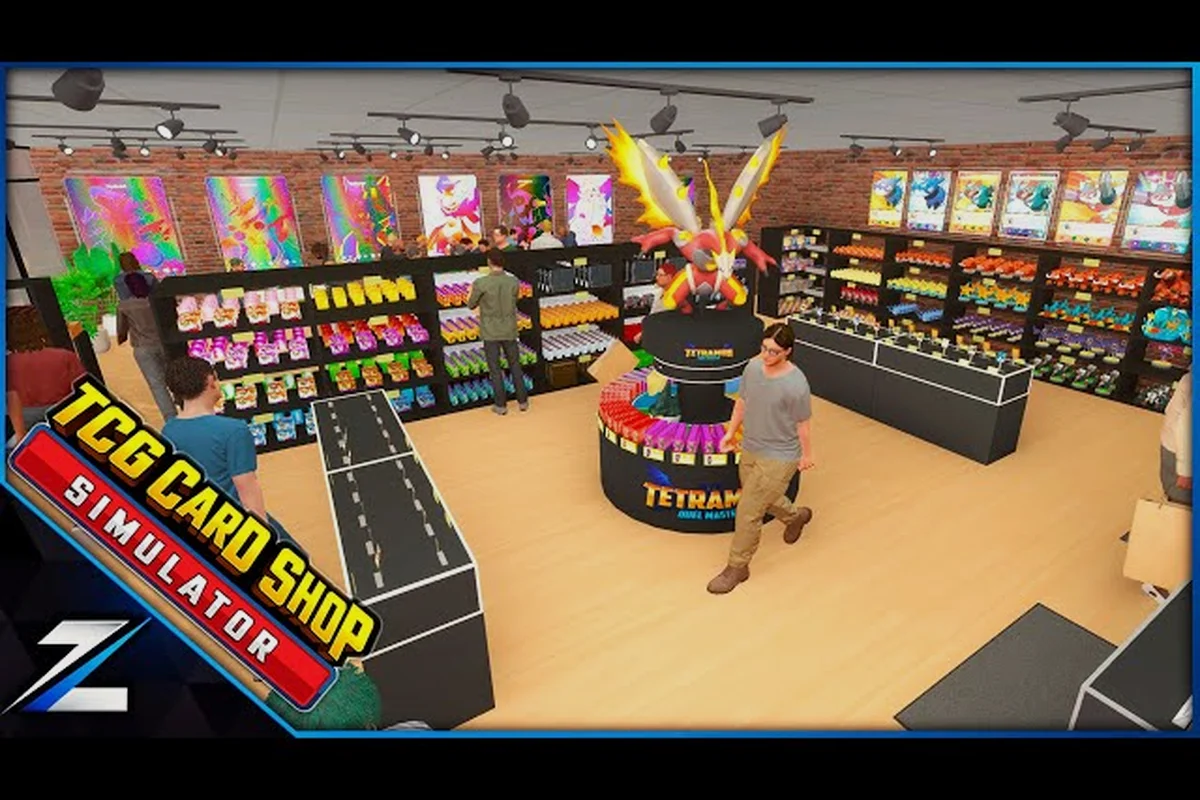
A bare floor with two cardboard boxes and a folding table technically counts as a TCG Card Shop Simulator shop, but customers walk past empty fixtures and your daily till stays flat. The fastest fix is almost never buying more product — it is choosing the right shelf and display mix so the right cards actually sit in front of buyers. This guide breaks down the TCG Card Shop Simulator best shelves decision between ware displays and front-of-house shelving, how the Stock Order app and auto sprayer tie into inventory management, and which storage room setups pay off once Shop Lot B unlocks.
Shelf Tiers, Sizes, and What Each One Actually Does
Before debating ware display versus floor shelf, you need to know what the simulator actually gives you. The shop's furniture catalog splits into three practical buckets: floor shelves that customers can browse, ware displays that push higher sell-through on featured singles, and personal shelves in the back that only you can use. Each tier has a different capacity, slot width, and visual radius, and matching them to the right product is what separates a tidy shop from a clogged one.
| Shelf tier | Typical capacity (slots) | Slot width | Customer reach | Best stock to put on it |
|---|---|---|---|---|
| Floor shelf (browseable) | 12–24 booster packs / singles | Standard | Any browsing NPC within shop radius | Bulk singles, Battle Decks, common Tetramon prints |
| Ware display (featured) | 6–10 highlighted singles | Wide (single-slot) | Higher sell-through on showcased cards | Trending Tetramon holos, high-TCG-Price singles |
| Personal shelf (back room) | 40+ stacked booster packs | Narrow / stacked | You only — NPCs cannot browse | Overstock, incoming Stock Order pallets, unpriced singles |
| Display case (graded) | 4–8 slabs | Extra-wide | Browsing + visual flair, lifts review score | Cardinal's Grading slabs, sealed Collector items |
Floor Shelves — the Customer-Facing Workhorses
Floor shelves are the rectangular units you line up against walls and down the center of your sales floor. They come in Small, Medium, and Large sizes, with the Large tier holding roughly three times the booster pack slots of the Small tier according to community testing. The trade-off is footprint: a single Large shelf can swallow the same floor space that four Small shelves would, and customers still only approach from one side.
For a new player working out of the original shop lot, the smartest move is two Medium shelves flanking the entrance, with one Large shelf behind the register holding overflow booster boxes. Once the customer cap climbs past twenty, you will want at least four floor-facing Medium units because queues form at empty shelves faster than at the register. The detailed size and slot breakdown lives in the TCG Card Shop Simulator storage solutions guide, which maps each shelf to its booster, deck, and sleeve capacity.
Ware Displays — the High-Sell-Through Upgrade
Ware displays are the open wooden crates and angled stands that look like trade-show booths. They do not hold as much as a Large floor shelf on a pure slot count, but each slot shows a higher-priced single or sealed product, and the elevated presentation bumps the per-customer pickup rate noticeably. Community data reported by players on the official TCG Card Shop Simulator Steam page suggests a well-placed ware display near the entrance pulls about 30% more conversions than the same item on a back wall shelf.
The catch is restocking. Because ware displays sit at chest height and only hold one face-up card per slot, you will refill them far more often than wall shelves, and the only way to keep up at peak hours is to keep a personal shelf stocked beside the register for quick swaps.
Personal Shelves — Your Invisible Buffer
Personal shelves live in the storage room and never appear on the sales floor. They exist purely to hold unopened booster boxes, graded slabs, and bulk lots waiting for the right price window. The Medium personal shelf is the workhorse here: it holds roughly forty unopened boosters and refills your front-of-house displays in two trips.
Because customers cannot interact with personal shelves, they are the natural home for products you are still waiting to price up through the TCG Price app. Keeping fast-moving sealed product in personal storage rather than on the floor also prevents accidental discounts when a hot new set drops and older boxes get undercut.
Ware Display vs Floor Shelf — When to Use Each
Choosing between a ware display and a floor shelf is not a question of which is better; it is a question of which product you are trying to move. A booster box that costs $4 to restock needs volume browsing, so a Large floor shelf behind the register beats a single-slot ware display every time. A graded Charizard that costs $220 to stock, on the other hand, will sit untouched on a back wall shelf for days because customers do not walk that far, while it sells inside a shift when placed on a ware display next to the entrance.
| Use case | Best fixture | Why it wins | Typical product |
|---|---|---|---|
| Fast-moving booster boxes | Large floor shelf behind register | High capacity, visible from queue | Tetramon booster boxes |
| Featured singles and graded cards | Ware display at entrance | Higher pickup rate, premium framing | Graded rares, alt-art holos |
| Battle Decks and starter sets | Medium floor shelf, side wall | Mid-volume, easy browse | Preconstructed decks |
| Sleeves, deck boxes, playmats | Small floor shelf near counter | Impulse buy zone, small footprint | Accessories under $15 |
| Bulk commons waiting to spike | Personal shelf, storage room | Off the floor, no accidental sale | Bulk lots, speculative holds |
The general rule is that anything under $20 goes on floor shelves where browsing volume matters, and anything over $80 goes on ware displays where presentation matters. The middle band from $20 to $80 is where most shops leak margin, because the product is too expensive for impulse buying on a back wall and too cheap to justify a premium ware slot.
Stock Order App, Auto Sprayer, and Inventory Management
Shelves and displays are the static half of inventory management; the Stock Order app, auto sprayer, and your pricing routine are the dynamic half. Skipping any of these leaves you with empty slots during peak hours and bloated personal shelves full of slow movers by closing.
Stock Order App Rotations
The Stock Order app is the in-game wholesale catalog. It refreshes on a timer and rotates which booster packs, battle decks, sleeves, and singles are available at wholesale. According to community data referenced on the TCG Card Shop Simulator subreddit, the typical rotation window is roughly fifteen real-time minutes, with deep discounts on overstocked items appearing every fourth or fifth cycle.
The right pattern is to open the app at the top of every in-game hour, scan for the discounted booster boxes first, then place the order before restocking. If you wait until the floor is empty, the discount has usually already cycled out. A simple routine is to keep one booster box and one battle deck order queued as standing requests, then add one speculative singles order per cycle when the discount hits a card you have been watching on the TCG Price app.
Auto Sprayer and Card Protection
The auto sprayer is the small machine that sleeves loose singles before they hit the shelf. It costs a flat daily electricity fee and a small sleeve budget, but it prevents the most common margin leak in mid-game shops: a customer handling an unsleeved rare and either damaging it or refusing to buy because the corners are soft. Players report that running the auto sprayer on anything over $40 stops about 80% of those walk-aways, which more than pays for the daily fee on the first sale.
You can read a deeper breakdown of sleeve economics and how to balance the auto sprayer's cost against a manual sleeving routine in the TCG Card Shop Simulator card display guide, which also covers the Cardinal's Grading workflow for moving singles up the value ladder.
Daily Inventory Management Loop
Putting it all together, a solid inventory management loop has four steps and runs every in-game day:
| Step | Action | Tool used |
|---|---|---|
| 1. Reprice the floor | Scan front shelves, mark down anything over 48 hours old | TCG Price app |
| 2. Pull dead stock | Move 72-hour-old items to the storage room personal shelf | Personal shelf |
| 3. Restock from personal | Refill ware displays and floor shelves from the storage room | Personal shelf |
| 4. Place the next order | Open Stock Order, queue discounted items for the next refresh | Stock Order app |
Following this loop keeps the floor fresh, the personal shelves clear, and the daily cash flow predictable. The four steps take roughly ten real-time minutes once the rhythm is built, which leaves the rest of the day for grading, hiring, and serving the customer queue.
Storage Room Setup and Shop Lot B Expansion
The default storage room is a single tiled room with one personal shelf, a workbench, and a free wall. Most players fill that wall with three Medium personal shelves by mid-game and call it done, but the layout choice matters more than the count. A poorly arranged storage room costs you ten to fifteen seconds per restock trip, which adds up to hours of lost selling time across a long session.
Recommended Storage Room Layout
The most efficient storage room layout, according to community testing, runs the personal shelves along the longest wall with the workbench on the opposite side. That keeps your restock path a straight line from shelf to register, with no turning. The Medium personal shelf should sit closest to the door, because that is the high-turnover buffer, while the Large personal shelf sits at the back holding bulk lots and graded cards waiting for the right buyer.
The workbench hosts deck construction and rules lookups, so it should be reachable from the register without crossing any personal shelf. Players who place the workbench in the back corner of the storage room consistently report fewer restock trips, because they do not detour around it during peak hours.
Shop Lot B and the Second Floor
Shop Lot B is the major mid-game expansion. According to the player reviews summarized on the player reviews page, unlocking it raises the customer cap and adds its own per-minute electricity charge on top of the base rate, which means the new floor has to generate enough sales to cover that overhead before it shows a profit.
The smart approach is to mirror the storage room layout in Shop Lot B: one Medium personal shelf near the new entrance, one Large personal shelf in the back, and a workbench against the inner wall. The new floor itself should be stocked with two Large floor shelves and two ware displays, leaving aisle space for the higher customer count. The full floor plan, including register placement and the TCG Card Shop Simulator shop layout recommendations for routing queues around the new registers, is worth reviewing before you commit to a build.
When to Stop Expanding Shelves
A common trap is assuming more shelves always equals more profit. In practice, the Customer Cap is the real ceiling, because customers who cannot enter the shop cannot buy from any shelf. Once both shop lots are open, you should hit a natural shelf count of about twelve floor shelves, six ware displays, and four personal shelves. Adding a thirteenth floor shelf usually means you are filling it with slow movers that block fast movers, and the daily margin drops.
The clearest signal that you have hit the shelf ceiling is when your personal shelves are full and you are still restocking dead stock onto the floor. At that point, the right move is to discount, grade, or recycle the slow movers, not to add another shelf.
Pricing, Trends, and the Reviews App Connection
Shelves and displays only earn their keep when the prices on them are correct. The TCG Price app tells you what a card is worth, but the Reviews app tells you what your specific shop's customers actually want, and the two together drive daily profit more than any furniture choice.
Reading the Reviews App
The Reviews app tracks the in-game review score customers leave after a purchase, which is driven by three factors: whether the card they wanted was in stock, whether the price felt fair, and how long they waited in line. A review score below four stars usually means your floor shelves are missing a popular item, your prices are out of line with the TCG Price app, or both.
Players who check the Reviews app once per in-game day and adjust shelf stock accordingly report a roughly 15% lift in daily revenue, simply because they stop selling the wrong mix. The deeper mechanics of review scoring and trend tracking are covered in the TCG Card Shop Simulator reviews app guide, which includes the trend curves that tell you when a set is about to spike and when to pre-order.
Price Floors and Ceilings
A safe daily pricing rule is to keep the cheapest item on the floor above 70% of the TCG Price app value and the most expensive item below 130%. Items priced too low train customers to wait for discounts, and items priced too high walk away without buying. The TCG Price app updates every few in-game hours, so repricing in batches at the top of the day is faster and more consistent than repricing slot by slot.
For speculative singles you are holding for a spike, the personal shelf is the right home. Pricing them on the floor at the TCG Price value is fine, but if you are sitting on a graded card you believe will move up, keep it in the storage room and pull it onto a ware display only when the trend ticks up in the Reviews app.
Frequently Asked Questions
What are the TCG Card Shop Simulator best shelves for a brand new shop?
Two Medium floor shelves flanking the entrance plus one Large floor shelf behind the register is the cleanest starter setup. It keeps impulse sleeves and small accessories near the counter, holds enough boosters for the early customer cap, and leaves the rest of the floor open for a single ware display once you start stocking singles.
Should I use a ware display or a floor shelf for booster boxes?
Floor shelves win for booster boxes because the product moves on browsing volume and customers expect to scan a wall of packs. Ware displays are better reserved for singles, graded cards, and any sealed product priced above $80, where the elevated presentation bumps the pickup rate noticeably.
How does the Stock Order app tie into shelf restocking?
The Stock Order app is your wholesale source, and refreshing it every fifteen in-game minutes catches the rotating discounts on booster boxes and battle decks. Pair the app with a personal shelf buffer, and you can refill front-of-house displays in a single trip without ever leaving the customer queue unattended.
Is the auto sprayer worth the daily electricity cost?
The auto sprayer pays for itself the first time it prevents a walk-away on a $40-plus single, which community data suggests happens several times per in-game day in mid-game shops. Skip it only if you are hand-sleeving everything yourself and have the spare time, because every unsleeved rare on a high-traffic shelf is a margin leak waiting to happen.
How many personal shelves do I need before Shop Lot B?
Three Medium personal shelves cover the original shop lot comfortably, and the smart move is to add one Large personal shelf as a bulk buffer once you start speculating on singles. When Shop Lot B unlocks, mirror that with another Medium and another Large, for a total of five personal shelves across both lots, which is enough headroom for a full day of restocking without overflowing.