
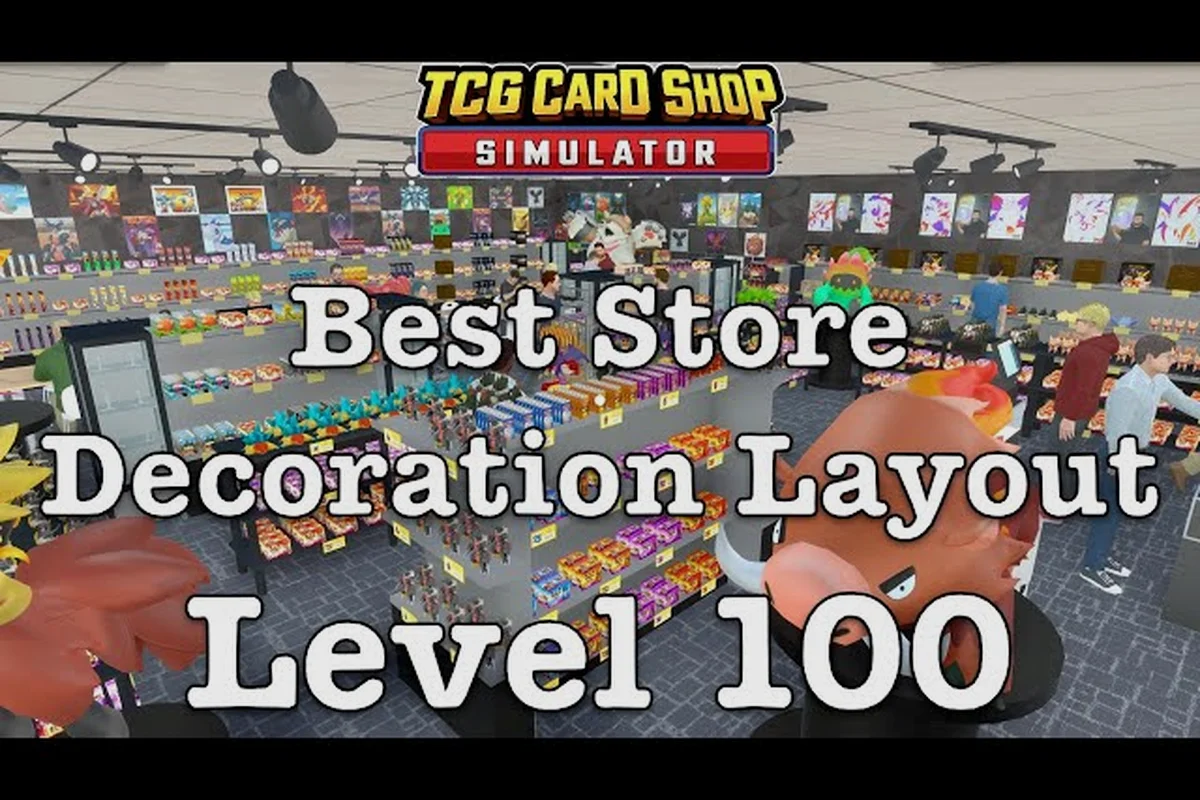
A cozy shop design in TCG Card Shop Simulator is the difference between a floor that drags customers in and a floor that quietly bleeds patience at the register. Counters, displays, decor, and auto sprayer coverage all feed the same engine: customer flow, review score, and the 28-customer ceiling. This guide maps the furniture pieces, floor zones, and small spacing rules that make a TCG Card Shop Simulator realistic shop feel warm instead of cluttered, and shows you how to keep that warmth profitable from the first week to the late-game expansion.
What a Cozy Shop Actually Means in TCG Card Shop Simulator
The term "cozy" gets thrown around on screenshots, but inside the engine it has three concrete jobs: a believable feel for a real-world local card store, smooth customer flow that respects the 28-cap, and a layout that lets your auto sprayer and checkout counter actually work. According to the official Steam community page for the official Steam listing, the sim is built around running a first-person local card store with a Tetramon collection spanning 4,436 cards, and a floor that holds up to 28 customers at once. That ceiling is the real reason cozy shop design matters: if your counters and shelves fight that ceiling, customers turn around at the door and never queue at the register.
The three jobs of cozy furniture
Every piece of TCG Card Shop Simulator furniture pulls triple duty: presentation, pathing, and review score. A well-placed personal shelf presents singles like a high-margin showcase, narrows the walkway just enough to slow traffic past a play table, and adds a decorative tick to your reviews average. A poorly placed warehouse shelf does none of those jobs; it just eats tile space and blocks the auto sprayer's range.
| Job | What it touches | Best furniture family | Cozy result |
|---|---|---|---|
| Presentation | Review score, rich-customer spawns | Personal Shelves, decor | Warm, lived-in look |
| Pathing | Queue length, patience timer | Card Displays, counters | Customers stop, browse, buy |
| Back-of-house | Restock speed, hygiene | Warehouse Shelves, Auto Sprayer | Floor stays clean between rushes |
Why counters anchor the whole floor
Counters are the single most important furniture piece in any TCG Card Shop Simulator cozy shop design. They mark the back wall of the sales floor, define where the queue forms, and decide whether your staff can reach the register without a long detour. Community reports on the r/TCGCardShopSimulator subreddit note that counters double as both a checkout surface and a visual boundary, which is why a single misplaced unit can turn a profitable afternoon rush into a deadlock at the door. In practice, the cozy look comes from counters that are warm-toned and at register height, with the auto sprayer tucked just behind them so the spray cone covers the busiest aisle.
Furniture Families and Where Each One Belongs
Before you start dropping tiles, it helps to know what each furniture family is actually good at. The community guide hub on Steam Community guides for TCG Card Shop Simulator breaks the catalog into four working families, and the cozy shop design pattern pulls from all four at once.
The four working families
| Family | Primary job | Where to place it | Cozy design note |
|---|---|---|---|
| Ware Displays | Boxed product, accessories | Front window, near the door | Frame the entry; show the boxes first |
| Card Displays | Singles, packs, tins | Mid-floor, near the register | Slow the queue; raise average sale |
| Personal Shelves | High-margin singles showcase | Along walls, behind counters | Best home for holo and graded cards |
| Warehouse Shelves | Bulk backstock | Stockroom, Shop Lot B | Keep the sales floor clean |
Mixing families without breaking flow
The trick to a TCG Card Shop Simulator realistic shop is layering, not stacking. A personal shelf against the back wall, a card display island in the middle of the floor, and a single ware display near the entrance work as a soft funnel that pulls customers from the door toward the register. If you stack three of the same family in one row, the floor feels commercial and customers bounce off the display, because the path widens and they don't feel guided. Community testing shared in the r/TCGCardShopSimulator threads suggests alternating shelf heights matters more than most players expect; the eye reads variation as a lived-in store, and that read feeds directly into your review score.
Planning the Counter Wall and Register Line
The counter wall is the spine of any cozy design. Get it wrong and the rest of the floor can't recover. Get it right and the room feels like a real hobby shop the moment a customer walks in.
Counter placement rules that actually work
-
Place one long counter along the back wall so staff can sweep between the register and the personal shelves without crossing customer paths.
-
Leave a 2-tile gap on one end for a play table or a small seating nook, which keeps the line from jamming against a wall.
-
Put the register dead-center in the counter so the queue forms symmetrically and patience drains evenly on both sides.
-
Hide one Auto Sprayer unit behind the counter so the cone covers the register, the back wall, and the first row of card displays in a single arc.
Counter line vs open-register style
| Layout style | Counter count | Best for | Cozy feel |
|---|---|---|---|
| Single back-wall counter | 1 | Solo runs, budget shops | Local hobby store vibe |
| L-shaped counter | 2 | Mid-game, one staff | Cafe + shop hybrid |
| Island register | 1 counter + 1 island | Late-game, hired staff | Open-floor flagship store |
| Double counter split | 2 | Two-register late-game | Busy Saturday rush |
For a first cozy shop design, the single back-wall counter is almost always the right call. It costs less, frames the register clearly, and leaves enough room on the sales floor to add a small play table — which the game uses to drive passive income and additional review score on every match. If you're planning a more ambitious build, a quick look at the shop layout guide is worth the detour, because the counter decision is the single biggest variable in your whole floor plan.
Auto Sprayer Coverage and the Hygiene Layer
A TCG Card Shop Simulator cozy shop design lives or dies by hygiene, because mess directly caps the number of customers that will stand in your queue. The Auto Sprayer is the most reliable tool for keeping the floor clean, and getting its coverage right is a placement problem more than a buy problem.
How the Auto Sprayer's cone works
The Auto Sprayer radiates a set cone in front of it, and that cone is wide enough to cover a small card display plus part of the register lane. Because the cone is directional, you can either back two units into a corner for full-room coverage or angle a single unit to cover the highest-traffic aisle. Community testing on the r/TCGCardShopSimulator board reports that one Auto Sprayer behind the counter covers roughly the register, the back wall, and the first row of card displays, which is usually the entire pain zone for a small shop.
| Coverage zone | How many Auto Sprayers | Best placement |
|---|---|---|
| Counter + register only | 1 | Behind the counter, angled forward |
| Full sales floor | 2 | Diagonal corners, cones overlapping |
| Shop Lot B back room | 1 | Centered on the back wall |
| Play table area | 1 | Just outside the play table's no-spray radius |
Where the Auto Sprayer quietly breaks cozy design
The biggest mistake players report is parking the Auto Sprayer in the open where it looks like a bare utility object, which fights the cozy feel even when the floor is technically clean. Two fixes work well: tuck the unit behind a personal shelf so the shelf hides the box, or place it under a counter overhang so only the cone is visible. Both approaches keep the floor warm while still giving the spray cone the line-of-sight it needs to do its job. For a deeper breakdown of unit placement and shelf pairing, the best shelves guide walks through how the Auto Sprayer fits into a working shelf stack.
Building a Realistic Storefront, Not Just a Floor
A cozy shop design isn't only about what's inside the tile grid; it's also about the front window, the wall paint, and the small decoration ticks that turn a sales floor into a believable local card store. The RENO BIGG and MY DIY apps are the two built-in tools that drive this layer, and they are more cost-efficient than most players realize.
Front window as the first sales surface
The first thing a customer sees walking in is the front window, and the game reads it as part of the sales floor for both queue and review purposes. A single ware display unit in the window, holding a few booster boxes, does triple duty: it blocks the harsh light, frames the entry path, and puts boxed product in the customer's line of sight before they ever reach a shelf. According to the OPNeon Games official announcements, the game's furniture families are split by job, with ware displays designed specifically for boxed product and accessories, which is why they read as the right piece in a window.
Wall paint, lighting, and small decor
The MY DIY app covers custom painting and small decor, and the RENO BIGG app covers larger renovation pieces like flooring and ceiling. Both feed the review score in increments, but the bigger payoff is the patience timer: community reports suggest customers hold their patience longer in warm-toned rooms, which means more time to make a second or third sale at the register. A few low-cost, high-yield tweaks to add early:
-
Warm beige or soft brown paint on the back wall behind the counter.
-
One neon sign or banner above the play table, which doubles as a beacon during events.
-
A small plushie stack near the register, which adds margin and a decorative read at the same time.
-
A rug or floor decal under the play table, which breaks up the tile grid without costing shelf space.
Layering Counters, Displays, and Play Tables for Real Flow
Once the counter wall, Auto Sprayer, and front window are placed, the last step is layering in the mid-floor pieces that turn a working floor into a cozy one. This is where most TCG Card Shop Simulator furniture placement tips earn their keep, because the wrong tile order kills both flow and feel at the same time.
A reliable three-zone floor plan
| Zone | What lives there | Cozy furniture mix | Customer behavior |
|---|---|---|---|
| Entry zone | Front window, ware display | 1 ware display, 1 small rug | Slows on entry, picks a box |
| Browse zone | Mid-floor card displays | 2–3 card displays, 1 personal shelf | Browses singles, builds a cart |
| Checkout zone | Counter, register, play table | 1 long counter, 1 play table, 1 Auto Sprayer | Queues, plays, spends |
The play table as a flow tool, not just income
The play table is often treated as a separate income stream, but in a cozy shop design it's actually a flow tool. A play table placed just past the browse zone, angled toward the counter, creates a soft pause point: customers finish a match, walk three tiles, and land at the register with cards in hand. Community data shared on the r/TCGCardShopSimulator subreddit suggests that tables placed within two tiles of a card display lift average sale size because customers grab singles to upgrade their deck on the way to the table. That single spacing rule is one of the highest-ROI TCG Card Shop Simulator furniture placement tips you can apply in the first hour.
Common Cozy Design Mistakes and How to Fix Them
Even experienced builders make the same handful of mistakes when they pivot to a cozy design. The good news is that each one has a small, low-cost fix, and most of them don't require any new furniture at all.
Mistake 1: too many personal shelves along the back wall
Personal shelves along the back wall look great in screenshots, but they crowd the counter and make the Auto Sprayer's cone harder to reach. The fix is to keep two personal shelves against the back wall and move the third to the side wall, where it still adds the high-margin showcase read but no longer fights the register.
Mistake 2: card displays in a single row
Three card displays in a straight line feel like a warehouse, not a hobby shop. Angling the middle unit by 45 degrees breaks the grid, slows traffic, and gives customers a small browsing pocket. It also helps the Auto Sprayer's cone reach between displays instead of being blocked by a long, solid wall of stock.
Mistake 3: the Auto Sprayer parked in the open
An Auto Sprayer sitting in the middle of the floor reads as a utility box, not a cozy piece. The fix is to back it into a corner, tuck it under a counter overhang, or hide it behind a personal shelf so only the spray cone is visible. The floor reads warmer immediately, and the cone still covers the same tile range.
Mistake 4: forgetting the storage room
A cozy design that ignores the storage room ends up with cardboard boxes and restock crates spilling onto the sales floor, which kills the warm read instantly. Moving warehouse shelves and bulk stock into Shop Lot B and the storage room keeps the sales floor clean and gives the front-of-house decor room to breathe. The furniture list guide is a useful map of which pieces are sales-floor items and which are back-of-house only.
Advanced Cozy Builds: When the Floor Outgrows the Default Tile Grid
Once the basic floor is in place, the next step in any TCG Card Shop Simulator cozy shop design is the upgrade path that takes the shop from a single room to a real two-zone flagship. This is where the late-game furniture unlocks and Shop Lot B start to matter, and where the cozy read either compounds or falls apart.
Shop Lot B as a clean overflow zone
Shop Lot B is the second physical shop area, and it's the right home for warehouse shelves, bulk stock, and the second Auto Sprayer. Keeping the overflow clean means the front shop can lean into decor without ever competing with cardboard. According to the OPNeon Games announcements page, the four furniture families are explicitly split by job, which means the front-of-house should lean on ware displays, card displays, and personal shelves, while the back-of-house leans on warehouse shelves.
Timing the upgrade order
| Stage | New unlock | Cozy design priority | Cost-to-cozy ratio |
|---|---|---|---|
| Shop Level 10 | First Auto Sprayer | Place behind the counter | High |
| Shop Level 20 | Better personal shelves | Add one along the side wall | Medium |
| Shop Level 30 | Shop Lot B access | Move warehouse shelves back | High |
| Shop Level 40 | Premium decor | Add neon sign + rug combo | Medium |
| Shop Level 45 | Late-game flooring | Replace tile with wood/rug | High |
Players planning a longer-term cozy push often cross-reference their progress against the how long to beat TCG Card Shop Simulator guide so they know roughly where each unlock lands in the campaign, which helps avoid spending late-game cash on early-game decor that gets replaced within a few hours.
Frequently Asked Questions
What is the cheapest way to start a cozy shop design in TCG Card Shop Simulator?
Keep the back-wall counter, a single Auto Sprayer behind it, one ware display in the front window, and a small card display island. That four-piece setup costs very little, frames the register, and still reads as a believable local card store while leaving budget for bulk stock. Add personal shelves only after Shop Level 20, when the side wall has room to spare.
Where should I place the Auto Sprayer for the best coverage?
Behind the counter, angled slightly toward the center of the sales floor, is the most reliable single-unit placement. The cone covers the register, the back wall, and the first row of card displays in a single arc. For a two-unit setup, park the second unit in the opposite corner so the cones overlap across the play table area.
How many counters do I actually need in a cozy build?
One long back-wall counter is enough for solo runs and most small shops. A second counter only earns its keep once you have at least two staff and a steady after-hours rush, because the second counter splits the queue and prevents patience from draining on a busy night. Anything beyond two counters tends to eat floor space without raising review score.
Do decoration pieces really affect the shop rating?
Yes, but the effect is incremental rather than headline-grabbing. Wall paint, neon signs, rugs, and plushie stacks each add small ticks to the review score, and those ticks compound over a long shift. The bigger payoff is the patience timer: a warm, lived-in room holds customers longer, which means more second and third sales at the register.
Can a cozy shop design still be profitable early?
Absolutely, and it usually is more profitable than a packed warehouse-style floor, because customers spend more time on a warm-toned floor and grab more singles on the way to the register. The first-week cash flow is mostly driven by ware displays in the window and a clean counter line; decor and personal shelves come after the cash flow is stable.